

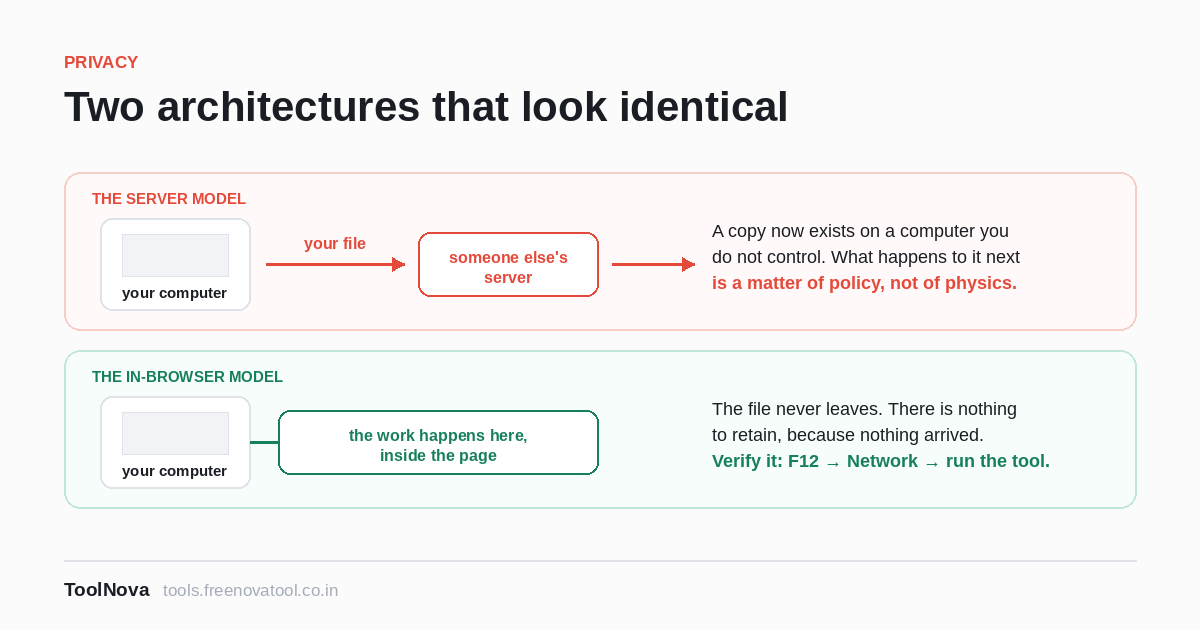
People hand documents to online PDF tools that they would not email to a colleague: bank statements, medical scans, signed contracts, passport photographs, salary slips. The question of whether that is safe deserves a better answer than a reassuring sentence in a footer, and the good news is that it has one. You can check.
Two completely different architectures, one web page
Everything that calls itself an online PDF tool is one of two things, and from the outside they look identical.
The server model. You pick a file, the browser uploads it to a company's servers, software there does the work, and you download the result. This is how most such sites have always worked, and for some jobs it is the only way. While it is happening, your document exists on a computer you do not control, and what happens to it next is governed entirely by that company's policy and practice — how long the file is kept, who can reach it, what is logged, which third parties are involved, which country the server is in.
The in-browser model. The page loads a program into your browser, and that program opens the file from your disk, does the work on your own machine, and hands you the result. The file is never transmitted. There is nothing to retain, because nothing arrived. This is possible because modern browsers can run genuinely fast code, and because the heavy lifting of reading and writing PDFs can be done in that environment.
The practical difference is not about how much you trust the company. It is that in the second model there is no copy of your document anywhere for anyone to mishandle, subpoena, leak, or forget to delete.
How to check which one you are using
This is the part worth learning, because it works on any site and takes under a minute. Your browser will tell you.
The network panel
- Open the tool's page.
- Press F12 (or Ctrl+Shift+I; on a Mac, Cmd+Option+I) to open developer tools, and click the Network tab.
- Clear the list, then select your file and run the tool.
- Watch what appears.
You are looking for a request with your file in it: a POST whose
size is comparable to your document. If you select a 12 MB PDF and a 12 MB
request goes out, the file was uploaded, whatever the page says. If the only
traffic is the page's own scripts and fonts — files of tens or hundreds of
kilobytes, loaded before you chose anything — then nothing left your machine.
Sort the requests by size. An upload is almost always the largest thing in the list by a wide margin, which makes this easy to read even if you have never opened this panel before.
The aeroplane test
Blunter and even more convincing. Load the tool's page, then disconnect from the internet — turn off Wi-Fi, pull the cable, switch on flight mode. Now use the tool.
If it works offline, it was never sending anything anywhere; it cannot. If it hangs or reports an error, it needed a server.
Two honest caveats. The page itself must have finished loading before you disconnect, and some features legitimately need a connection even in the in-browser model. On this site there is exactly one: OCR downloads a language data file the first time you use a given language, because shipping every language to every visitor would be absurd. The file it fetches is the language data, and your document still does not move. Everything else here will run with the network off.
What "we delete your files after an hour" is worth
Not nothing, and not much. It is a promise about a file that was uploaded, and it depends on the company meaning it, implementing it correctly, and the promise surviving a backup system, a crash dump, a log rotation, a server migration and an acquisition. Organisations that handle this carefully exist. The point is only that you are relying on a policy rather than on physics.
"Encrypted in transit" is a different and weaker claim still: it means the file cannot be read while it is travelling to the server. It says nothing at all about what happens once it arrives.
What to actually watch out for
In-browser processing removes one risk. It does not make a website trustworthy in general, and there are real things to check that have nothing to do with where the PDF is processed.
- What the page loads from elsewhere. Trackers and ad scripts cannot read your file, but they can record that you visited a page called "divorce-agreement-template". The URL is data too.
- Where the result goes. A tool that processes locally and then offers to "save to the cloud" has just introduced the upload by a different door.
- Browser extensions. An extension with permission to read page contents sits inside the same browser your document is open in. In the threat model that matters for a sensitive file, that is closer to it than any website is.
- Vagueness. A tool that will not say plainly whether it uploads has told you something. The ones that process locally say so specifically, because it is the hardest thing for a competitor to copy.
Where we stand
Every tool on this site except OCR's one-time language download does its work in your browser. Your files are not uploaded, which is why there is no account to create and no storage to manage. We have written out the details, tool by tool, on how we handle your files, and what we collect about visits on the privacy policy.
But the reason this article is mostly about F12 rather than about us is that a claim you can verify is worth more than one you are asked to believe. Run the network panel on this site. Run it on the next site too.